管理工作流
需要 OEM 协议
n8n 的 OEM 部署需要与 n8n 签订单独的商业协议。更多信息请联系 n8n。
管理跨团队或组织的 n8n OEM 部署时,通常需要为多个用户运行相同或相似的工作流。有两种方式:
| 方案 | 优点 | 缺点 |
|---|---|---|
| 为每个用户创建一个工作流 | 不限制工作流启动方式,可使用任意触发器 | 需要管理多个工作流。 |
| 创建单个工作流,执行时传入用户凭据 | 简化工作流管理,只需修改一个工作流 | 必须由你的产品调用,才能运行工作流。 |
本文引用的 API 可能随时更改。每次升级版本时,都应检查其功能是否仍然正常。
每个用户一个工作流
一般分为三个步骤:
1. 获取用户凭据
需要收集该用户在所有需身份验证的节点或服务上使用的凭据,以及特定工作流要求的其他参数。具体凭据和参数取决于工作流及要完成的任务。
2. 创建用户凭据
获取所有相关凭据详情后,可以在 n8n 中创建对应服务凭据,通过编辑器界面或 API 调用完成。
使用编辑器界面
- 从菜单选择 Credentials(凭据)> New(新建)。
- 使用下拉菜单选择要创建的 Credential type(凭据类型),例如 Airtable。
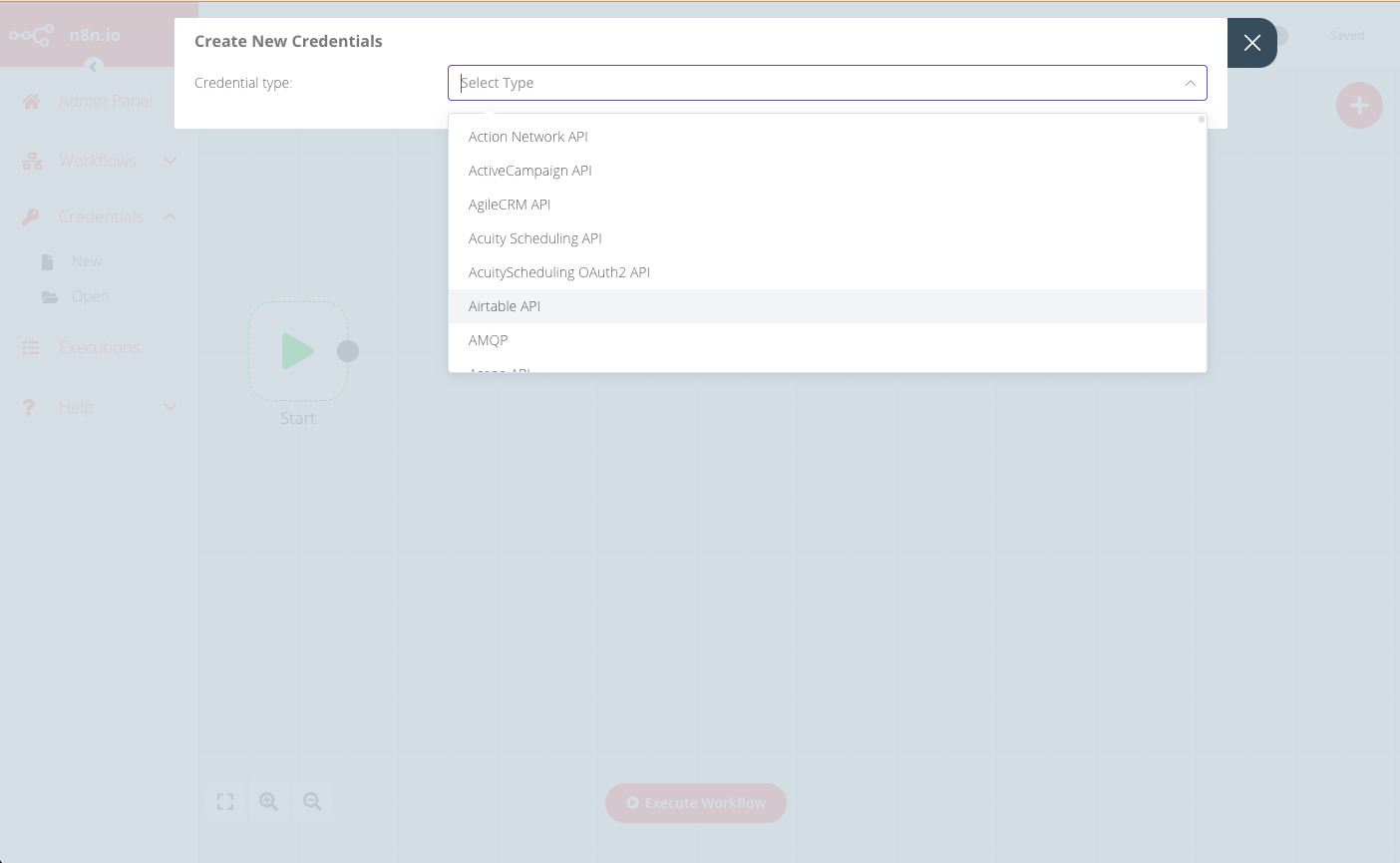
- 在 Create New Credentials(创建新凭据)弹窗中,输入该用户的对应凭据详情,并选择可以访问这些凭据的节点。
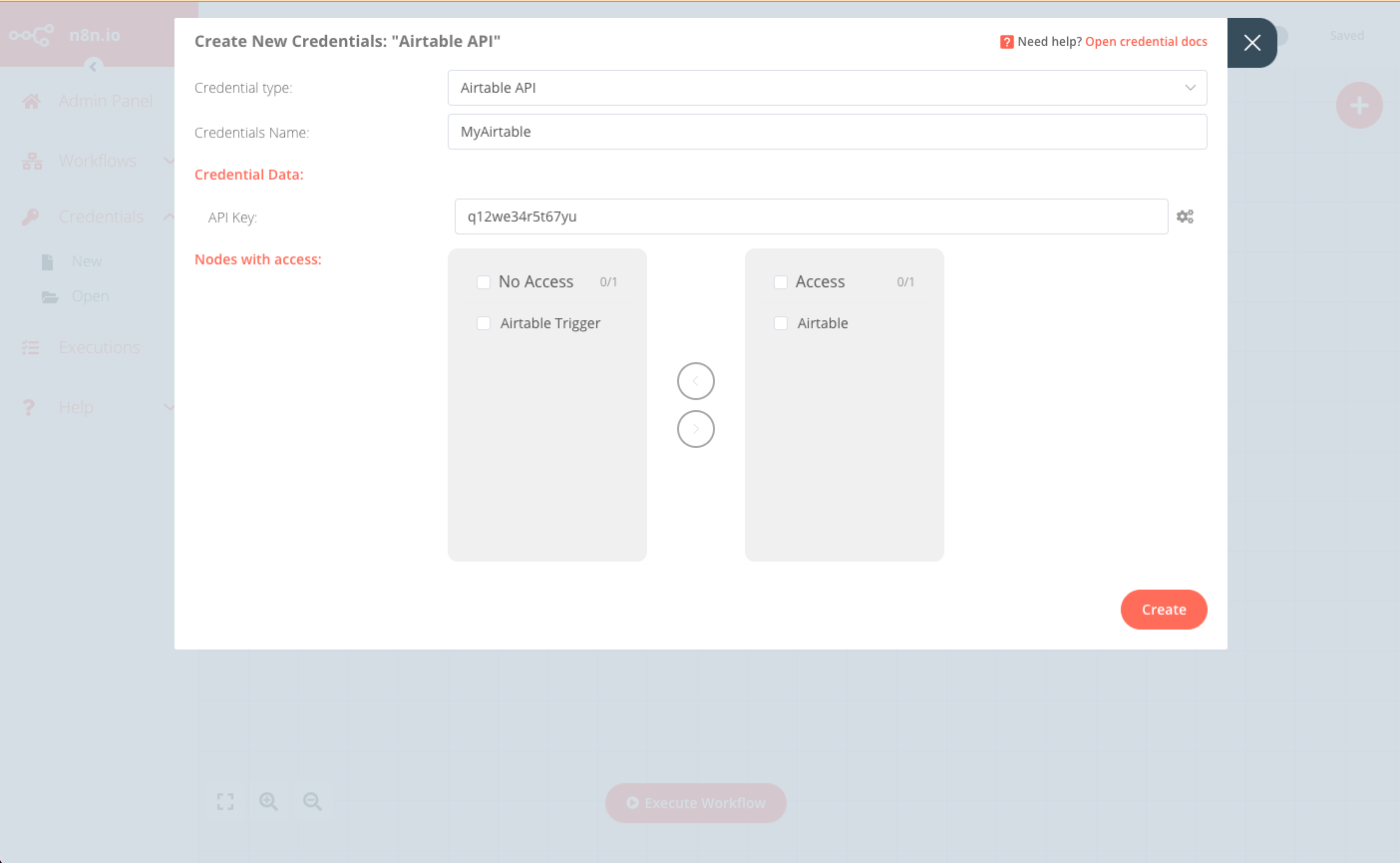
- 点击 Create(创建)完成并保存。
使用 API
也可以调用编辑器界面所用的前端 API,实现相同结果。API 端点格式为:https://<n8n-domain>/rest/credentials。
例如,要创建上面编辑器界面示例中的凭据,请发送以下请求:
POST https://<n8n-domain>/rest/credentials
请求体如下:
{
   "name":"MyAirtable",
   "type":"airtableApi",
   "nodesAccess":[
      {
         "nodeType":"n8n-nodes-base.airtable"
      }
   ],
   "data":{
      "apiKey":"q12we34r5t67yu"
   }
}
响应包含新凭据的 ID,之后为该用户创建工作流时会用到:
{
   "data":{
      "name":"MyAirtable",
      "type":"airtableApi",
      "data":{
         "apiKey":"q12we34r5t67yu"
      },
      "nodesAccess":[
         {
            "nodeType":"n8n-nodes-base.airtable",
            "date":"2021-09-10T07:41:27.770Z"
         }
      ],
      "id":"29",
      "createdAt":"2021-09-10T07:41:27.777Z",
      "updatedAt":"2021-09-10T07:41:27.777Z"
   }
}
3. 创建工作流
最佳实践是维护一个“基础”工作流,再为每个新用户复制,并使用其凭据和其他详情进行定制。
可以通过编辑器界面或 API 调用复制和定制模板工作流。
使用编辑器界面
-
从菜单选择 Workflows(工作流)> Open(打开),打开要复制的模板工作流。
-
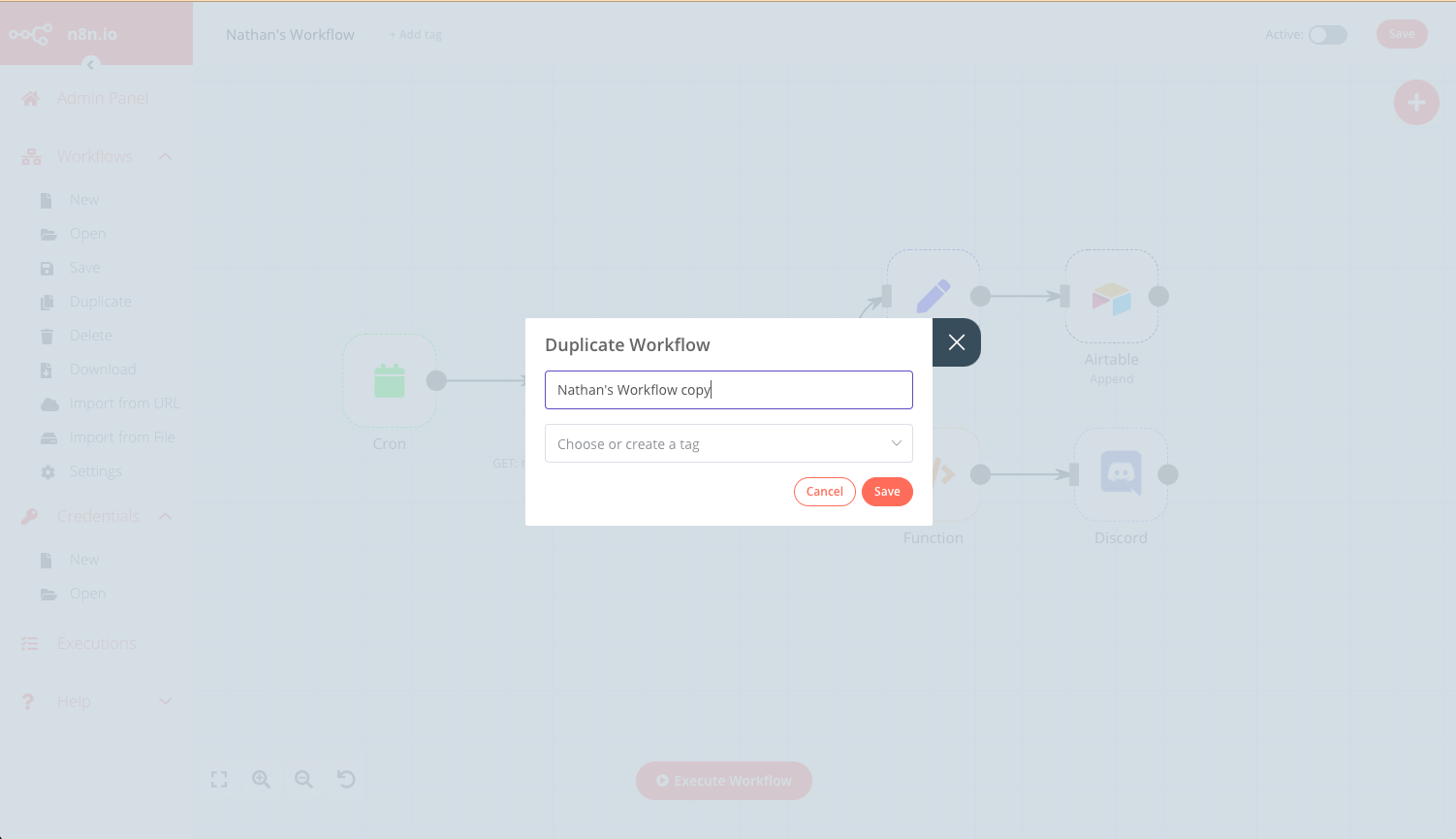
选择 Workflows(工作流)> Duplicate(复制),输入新工作流名称,然后点击 Save(保存)。
-
更新所有相关节点,使用上文为此用户创建的凭据。
-
Save(保存)工作流,并点击右上角 Publish(发布)将其发布。
使用 API
- 使用以下端点获取模板工作流的 JSON:
https://<n8n-domain>/rest/workflows/<workflow_id>
GET https://<n8n-domain>/rest/workflows/1012
响应包含所选工作流的 JSON 数据:
{
  "data": {
    "id": "1012",
    "name": "Nathan's Workflow",
    "active": false,
    "nodes": [
      {
        "parameters": {},
        "name": "Start",
        "type": "n8n-nodes-base.start",
        "typeVersion": 1,
        "position": [
          130,
          640
        ]
      },
      {
        "parameters": {
          "authentication": "headerAuth",
          "url": "https://internal.users.n8n.cloud/webhook/custom-erp",
          "options": {
            "splitIntoItems": true
          },
          "headerParametersUi": {
            "parameter": [
              {
                "name": "unique_id",
                "value": "recLhLYQbzNSFtHNq"
              }
            ]
          }
        },
        "name": "HTTP Request",
        "type": "n8n-nodes-base.httpRequest",
        "typeVersion": 1,
        "position": [
          430,
          300
        ],
        "credentials": {
          "httpHeaderAuth": "beginner_course"
        }
      },
      {
        "parameters": {
          "operation": "append",
          "application": "appKBGQfbm6NfW6bv",
          "table": "processingOrders",
          "options": {}
        },
        "name": "Airtable",
        "type": "n8n-nodes-base.airtable",
        "typeVersion": 1,
        "position": [
          990,
          210
        ],
        "credentials": {
          "airtableApi": "Airtable"
        }
      },
      {
        "parameters": {
          "conditions": {
            "string": [
              {
                "value1": "={{$json[\"orderStatus\"]}}",
                "value2": "processing"
              }
            ]
          }
        },
        "name": "IF",
        "type": "n8n-nodes-base.if",
        "typeVersion": 1,
        "position": [
          630,
          300
        ]
      },
      {
        "parameters": {
          "keepOnlySet": true,
          "values": {
            "number": [
              {
                "name": "=orderId",
                "value": "={{$json[\"orderID\"]}}"
              }
            ],
            "string": [
              {
                "name": "employeeName",
                "value": "={{$json[\"employeeName\"]}}"
              }
            ]
          },
          "options": {}
        },
        "name": "Set",
        "type": "n8n-nodes-base.set",
        "typeVersion": 1,
        "position": [
          800,
          210
        ]
      },
      {
        "parameters": {
          "functionCode": "let totalBooked = items.length;\nlet bookedSum = 0;\n\nfor(let i=0; i < items.length; i++) {\n  bookedSum = bookedSum + items[i].json.orderPrice;\n}\nreturn [{json:{totalBooked, bookedSum}}]\n"
        },
        "name": "Function",
        "type": "n8n-nodes-base.function",
        "typeVersion": 1,
        "position": [
          800,
          400
        ]
      },
      {
        "parameters": {
          "webhookUri": "https://discord.com/api/webhooks/865213348202151968/oD5_WPDQwtr22Vjd_82QP3-_4b_lGhAeM7RynQ8Js5DzyXrQEnj0zeAQIA6fki1JLtXE",
          "text": "=This week we have {{$json[\"totalBooked\"]}} booked orders with a total value of {{$json[\"bookedSum\"]}}. My Unique ID: {{ $(\"HTTP Request\").params.headerParameters.parameters[0].value }}"
        },
        "name": "Discord",
        "type": "n8n-nodes-base.discord",
        "typeVersion": 1,
        "position": [
          1000,
          400
        ]
      },
      {
        "parameters": {
          "triggerTimes": {
            "item": [
              {
                "mode": "everyWeek",
                "hour": 9
              }
            ]
          }
        },
        "name": "Cron",
        "type": "n8n-nodes-base.cron",
        "typeVersion": 1,
        "position": [
          220,
          300
        ]
      }
    ],
    "connections": {
      "HTTP Request": {
        "main": [
          [
            {
              "node": "IF",
              "type": "main",
              "index": 0
            }
          ]
        ]
      },
      "Start": {
        "main": [
          []
        ]
      },
      "IF": {
        "main": [
          [
            {
              "node": "Set",
              "type": "main",
              "index": 0
            }
          ],
          [
            {
              "node": "Function",
              "type": "main",
              "index": 0
            }
          ]
        ]
      },
      "Set": {
        "main": [
          [
            {
              "node": "Airtable",
              "type": "main",
              "index": 0
            }
          ]
        ]
      },
      "Function": {
        "main": [
          [
            {
              "node": "Discord",
              "type": "main",
              "index": 0
            }
          ]
        ]
      },
      "Cron": {
        "main": [
          [
            {
              "node": "HTTP Request",
              "type": "main",
              "index": 0
            }
          ]
        ]
      }
    },
    "createdAt": "2021-07-16T11:15:46.066Z",
    "updatedAt": "2021-07-16T12:05:44.045Z",
    "settings": {},
    "staticData": null,
    "tags": []
  }
}
-
保存返回的 JSON 数据,并为新用户更新相关凭据和字段。
-
将更新后的 JSON 作为请求体,通过以下端点创建新工作流:
https://<n8n-domain>/rest/workflows
POST https://<n8n-domain>/rest/workflows/
响应包含新工作流的 ID,下一步会用到。
- 最后,发布新工作流:
PATCH https://<n8n-domain>/rest/workflows/1012
在 JSON 请求体中传入额外值 active:
// ...
"active":true,
"settings": {},
"staticData": null,
"tags": []
单个工作流
实现此方式分为四个步骤:
创建工作流
工作流的具体内容和范围会因使用场景而有很大差异,但有几个设计要点需要注意:
- 此工作流必须由 Webhook 节点触发。
- 入站 webhook 调用必须包含用户凭据,以及所需的其他工作流参数。
- 每个需要用户凭据的节点都应使用表达式,让节点的凭据字段读取 webhook 调用提供的凭据。
- 保存并发布工作流,确保 Webhook 节点选择生产 URL。更多信息请参阅 Webhook 节点。
调用工作流
对于每个新用户,或按需为现有用户,调用作为工作流触发器的 webhook,并提供必要凭据及其他工作流参数。