故障排查
凭据
错误消息:'Credentials of type "*" aren't known'
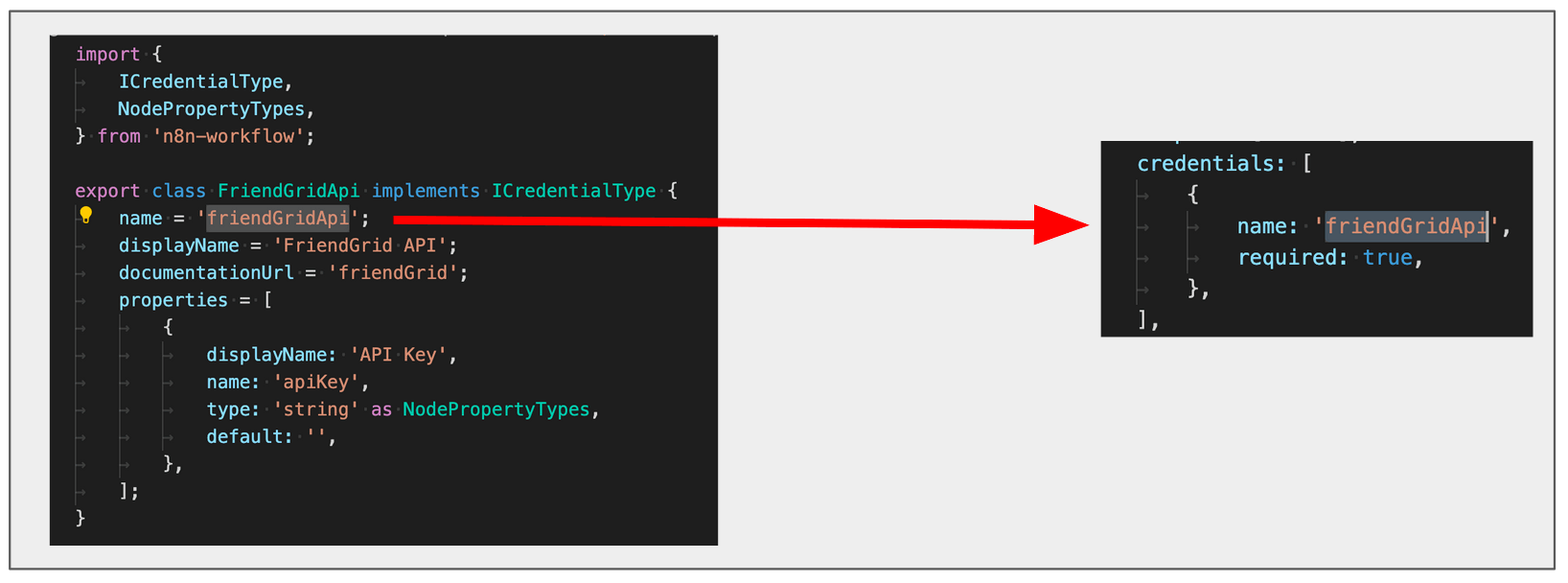
检查 credentials 数组中的名称,是否与凭据类的 name 属性一致。例如,以下凭据类将 name 设为 friendGridApi:
export class FriendGridApi implements ICredentialType {
	name = 'friendGridApi';
	displayName = 'FriendGrid API';
	documentationUrl = 'friendGrid';
	properties = [
		{
			displayName: 'API Key',
			name: 'apiKey',
			type: 'string' as NodePropertyTypes,
			default: '',
		},
	];
}
节点的 credentials 数组必须引用相同的 name 值:
credentials: [
	{
		name: 'friendGridApi',
		required: true,
	},
],
编辑器界面
错误消息:'There was a problem loading init data: API-Server can not be reached. It's probably down'
- 检查节点文件名、节点目录名和类名,是否与添加到
packages/nodes-base/package.json的路径匹配。 - 检查
displayOptions属性使用的名称,是否与节点界面元素的名称一致。
节点图标未显示在添加节点菜单和编辑器界面中
- 检查图标是否与节点位于同一目录。
- 检查图标格式是否为 PNG 或 SVG。
icon属性引用图标文件时,应包含扩展名(.png或.svg),并使用file:前缀,例如file:friendGrid.png或file:friendGrid.svg。
节点图标尺寸不合适
- 使用 SVG 时,请确保画布为正方形。可参考 GIMP 调整画布大小指南修改 SVG 画布尺寸。
- 使用 PNG 时,请确保尺寸为 60×60 像素。
节点未显示在添加节点菜单中
检查是否已在项目的 package.json 文件中注册节点。
刷新后,description 属性的更改未显示在界面中
每次更改 description 属性后,都需要停止当前 n8n-node dev 进程(ctrl + c)并重新运行。
linter 错误警告文件名大小写
节点 linter 对文件名有规则,包括大小写。Windows 用户重命名文件后,可能仍持续收到警告。这是由 Windows 在仅更改文件名大小写时的一个已知问题导致的。
相关资源
本文为社区中文翻译。查看对应英文原文